NOTIFICATION CENTER: DAILY PASSIVE VITAL REPORT
Definitions
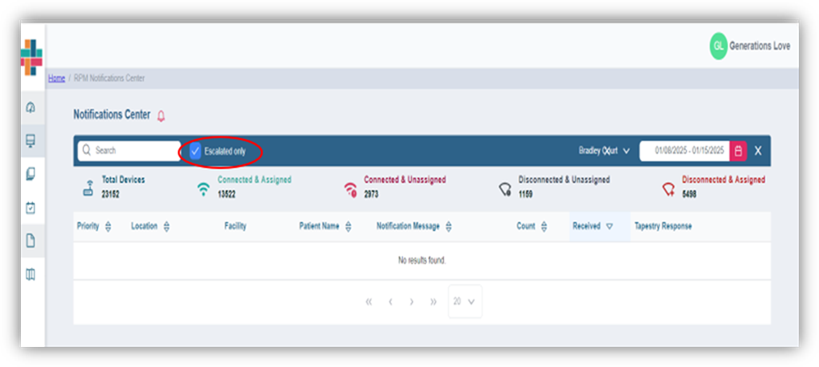
Total Devices- Number of devices installed at a facility
Connected & Assigned- Number of patients assigned to the devices
Connected & Unassigned- Number of devices connected but not assigned to patients
Disconnected & Unassigned- Number of devices disconnected and not assigned to patients
Disconnected & Assigned- Number of devices disconnected and have patients assigned
Search: The user can search/filter the queue by patient name
Escalation Met: Check this box to see only those passive vital notifications that were escalated to the facility
Facility: User capability of filtering by corporation, facility, unit, floor
Calendar: Filters queue by day and month. Users can filter by 8-day increments
Clear all filters: Click on “X” next to the calendar icon to clear all current filters
Priority: Passive vital notifications are prioritized by acuity- High, Medium, and Low
Notification Message: Text description of passive vital notification received
Count: Displays the total number of passive vital notifications received for each patient within the specified date range
Received: Displays date and time of last notification received within the specified date range
Tapestry Response: In this column, users can see the outcomes of passive vital notifications reviewed by Tapestry Clinical Review team
DAILY PASSIVE VITAL NOTIFICATION QUEUE
- Begin by filtering queue to facility by clicking on carat to right of facility text
- Select Escalate Only to view only the passive vital notifications that have been escalated to facility
- Choose a date range by clicking on calendar icon and selecting date range. Max is 8 days per range.
- Queue will populate with patients according to filters set in navigation bar
- The queue can be sorted by ascending/descending order by selecting triangles next to each header.
- User can prioritize the queue by priority of notification or search by patient name

Priority: Passive vital notifications are listed by priority- High, Medium, and Low
Notification Message: Text description of the highest priority notification received within selected date range
Count: Displays the total number of passive vital notifications received for each patient within the specified date range
Received: Displays date and time of last notification received within the specified date range
Tapestry Response: In this column, users can view passive notification escalations created by Tapestry Clinical Review team
Was this article helpful?
That’s Great!
Thank you for your feedback
Sorry! We couldn't be helpful
Thank you for your feedback
Feedback sent
We appreciate your effort and will try to fix the article