
See what’s changing, when it goes live, and how your team can get ready.
We’re excited to share that we’re rolling out a new update to your Customer Portal this month. This release is designed to make it easier for you to search for patients, access AI assistance, and to improve overall performance and usability.
What’s New in This Release
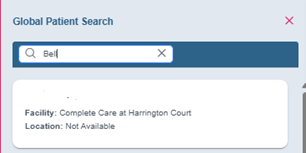
- Global Patient Search on Dashboard
- The Global Patient Search will allow users to search for patients across all facilities they have access to.
- Users can quickly locate patient records by name, view key patient details and access patient info regardless of facility location.
- Available to all users with Dashboard access
Demo Screenshot:

- What’s New Announcement Popup
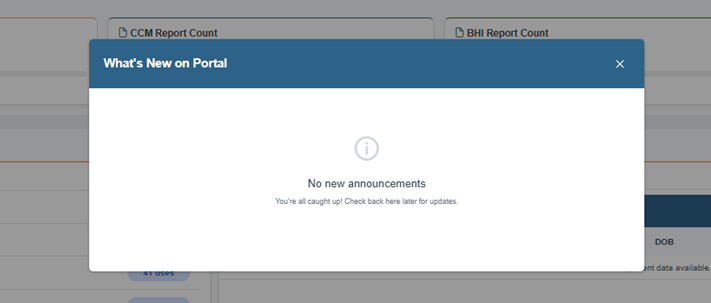
- The “What’s New” announcement popup appears automatically on the dashboard page after successful login, displaying active announcements users haven’t acknowledged.
- Users can interact with announcements using “Got it” (marks as read and won’t show again) or “Later” (dismisses for current session, reappears on next login if still unread) buttons
- Available to all users
Demo Screenshot:
- Top 10 Medication Widget – Patient Drill Down
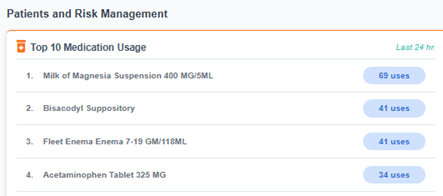
- Enhanced the widget to allow clinicians to click on medication usage numbers to see a list of patients using that medication
- Clicking on medication usage number opens a patient list dialog showing all patients currently using the selected medication
- Patient list includes patient name, MRN, DOB, and Report information
- Dialog is responsive and works on different screen sizes
- Available to all users with Dashboard access
Demo Screenshot:

-Last Updated Timestamp on KPI
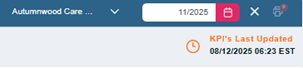
- Added a “Last Updated” timestamp with time zone reference to KPI widgets on CCM Reviews, BHI Reviews pages
- Timestamp is visible on all KPI widgets and updates when KPI data is refreshed on backend
- Available to all users with access to review pages
Demo Screenshot:
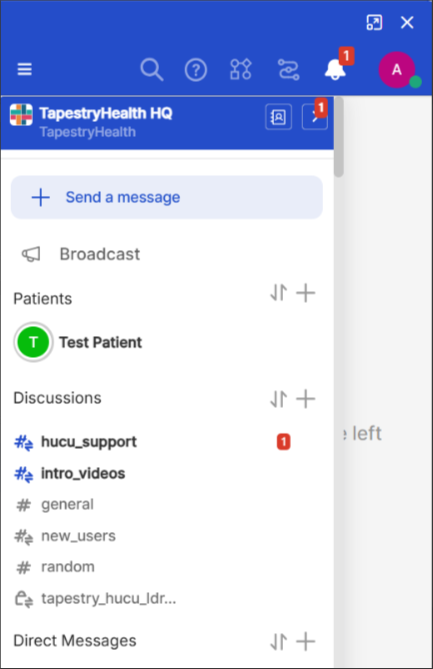
- AI Chat Integration
- AI chat interface integrated directly into the Portal header, giving users a persistent sidebar chat experience
- Chat button visible in the header navigation bar, clicking it opens a sidebar from the right side
- Sidebar supports full screen mode, can be closed via close button or ESC key
- Available to all users
Demo Screenshot:

Enhancements
-Improved Location Display
- Replaced the “Discharged” label with “Not Available” when patient location data is missing across all Customer Portal pages
- Helps clinicians distinguish between missing data and actual patient discharge status
- Available to all users
-Allergy Placeholder Message
- Added a placeholder message that displays when there are no allergies recorded for a patient in the Patient Details Page
- Allergies label remains visible even when there are no allergies
- Available to all users with access to Patient Details
-Hidden Patient ID Field
- We have hidden the Patient ID field on the Patient Details Page across all review types and in final printable reports
- Ensures the interface displays only relevant patient information without technical identifiers
- Available to all users with access to Patient Details
-Disabled Notification Threshold for Admin Roles
- Disabled the ability to set Notification Threshold for Tapestry Admin and Auditor roles
- Available to Tapestry Admin and Auditor roles (feature disabled for these roles)
Bug Fixes (User-Visible)
-Patient List Modal Resizing Issue
- Fixed issue where the patient list modal was resizable and trimmed chronic conditions at certain screen resolutions
- Available to all users
-User Management Table Display
- Fixed issue where the User Management table was malformed for some facility admin users, displaying table content multiple times
- Available to facility administrators
Why This Matters
These enhancements are aimed at helping your team:
- Improve workflow efficiency by allowing users to quickly locate patients directly from the Dashboard across all the facilities they have access to.
- AI Chat Integration provides users with direct access to AI assistance without leaving their current workflow
- The “What’s New” announcement system enables administrators to communicate important information to all users efficiently
- Enhanced data display improvements, including location labels, allergy placeholders, hidden patient IDs
Our goal is to continuously improve the Customer Portal so your team can work more efficiently and confidently.
- Expected Impact: No downtime expected
Support Resources
If you have questions or need assistance, please contact our Account Management team
AccountManagement@tapestryhealth.com
We appreciate your partnership and look forward to hearing your feedback on this release.
Was this article helpful?
That’s Great!
Thank you for your feedback
Sorry! We couldn't be helpful
Thank you for your feedback
Feedback sent
We appreciate your effort and will try to fix the article